

How to Set Up a Lone Worker Check-In Procedure Beyond Cell Coverage
A step-by-step lone worker check-in procedure for remote crews: risk assessment, check-in schedule, receivers, missed-contact escalation, and a free template.
If someone on your crew needed help while working alone, how soon would anyone know?
A lone worker check-in procedure is the written plan that answers that question. It sets when each worker makes contact, who receives that contact, and what the receiver does if it doesn't arrive.
The Canadian Centre for Occupational Health and Safety (CCOHS) recommends one main contact plus a backup, a set check-in schedule, a written contact log, and an emergency plan for missed check-ins. Where cell service is unreliable, CCOHS advises having alternative communication available, including satellite technology.
So how to build your lone worker plan? We’ve got a customizable process, an easy-to-apply check-in log, and why this all works. Use the steps and templates below to draft a procedure for your crew, then review it against your risk assessment and applicable requirements, assign responsibilities, and test it before use.
Step 1: Assess the risk of each lone-work task before setting check-in times
CCOHS defines a person as working alone when they can't be seen or heard by another person, and it lists forestry workers, geologists, and arborists among field workers who often do. Whether lone work is high or low risk depends on the location, the type of work, and the consequences of an incident, so assess each task on its own.
For tasks with a recognized risk, CCOHS first recommends avoiding lone work where possible. For the rest, answer these questions:
- How long will the worker be alone, and at what time of day?
- Is the task high risk? CCOHS lists work at heights, in confined spaces, with hazardous energy, and with equipment such as chainsaws.
- What communication works at the site, and does it still work once the worker leaves the vehicle?
- What happens if the vehicle breaks down? Are fatigue, temperature extremes, or wildlife a factor?
Set the check-in interval from the answers, with more frequent contact for higher-risk work. Requirements differ by jurisdiction. In British Columbia, WorkSafeBC requires a written procedure for checking a worker’s well-being, with check intervals developed in consultation with the worker. Federally regulated workplaces fall under the Canada Labour Code, and the federal Labour Program’s guidance on working alone explains how its provisions apply. Check the rules in your own province, territory, or state.
Step 2: Build the check-in sequence from departure to safe return
Every shift needs three kinds of contact, each with a time attached.
- Departure. Before leaving, the worker files a daily work plan with the receiver. CCOHS lists what the main contact should know: destination and intended route, estimated arrival time, return time, contact information, mode of travel, and the alternate plan for bad weather or road problems.
- Scheduled contact. The worker checks in at set times or set points in the work, such as arrival on site, mid-shift, and before starting a high-risk task.
- Safe return. The shift isn't closed until the worker confirms they're back at base or out of the field. In British Columbia, WorkSafeBC requires a check at the end of each work shift.
Agree on a code word that confirms help is needed, as CCOHS suggests, and cover work outside business hours. With ZOLEO, each of these contacts can be a one-button Check-In from the device, with no phone needed. By default, a Check-In can include the worker’s location, giving the receiver another useful reference point for the shift.
Step 3: Assign a check-in receiver and a backup for every shift
Name one receiver and one backup for each shift, by name rather than by role. The receiver watches for each check-in, records it in the log, and starts escalation if one is missed. The backup takes over if the receiver is unreachable or off shift.
The receiver and backup are part of the worker’s Safety Circle of colleagues, supervisors, and designated contacts: the people who expect to hear from the worker and know what to do if they don't. Contact should run both ways, so where possible, CCOHS suggests the contact person check on the worker periodically. CCOHS also says the responder needs training, just as the lone worker does. Add both as Check-In contacts so every Check-In reaches them at the same time.
Step 4: Write the missed check-in escalation steps
CCOHS says the contact person must know when and how to activate the emergency plan. Write the steps in advance, with a time on each:
- Grace period. Wait a set window after the scheduled time. Set its length based on the risk assessment.
- Reach out. Try the worker on every channel available, including a text to their ZOLEO’s dedicated number.
- Widen the circle. Contact the backup receiver and the crew lead or nearest co-worker.
- Locate. Pull the worker's last known location from the most recent check-in and the work plan.
- Activate. If there's still no contact by the escalation deadline, start the emergency plan: send help to the last known location and call emergency services.
Log every attempt with its time.
Step 5: Train the crew and test the procedure before the first shift
Make sure workers and receivers understand the procedure before it’s used. In British Columbia, WorkSafeBC requires both the worker and anyone assigned to check on them to be trained in it, and the procedure to be reviewed at least once a year. Send a check-in from the field before the first real shift, confirm the receiver gets it, and rehearse a missed check-in. CCOHS adds: report near misses and update the procedure from them.
How a ZOLEO Check-In fits the procedure beyond cell coverage
As a Safety and Preparedness Platform, ZOLEO helps workers check in beyond cell coverage, so supervisors and designated contacts can stay informed even when crews are working remotely.
A ZOLEO Check-In¹ works from the device alone, with no phone or app needed, so a worker can check in with one button even if their phone is unavailable. It reaches up to five assigned contacts by SMS, email, or the ZOLEO app. By default, a successful Check-In includes an “I’m OK” message, coordinates, a map link, and the device’s battery level. Location sharing in standard Check-Ins can be turned off. When paired with the app, ZOLEO also supports two-way messaging across available satellite, cellular, and Wi-Fi connectivity.
That gives the receiver the last known location that Step 4, Write the missed check-in escalation steps, depends on.
Three details belong in your written procedure:
- The worker sends each Check-In. It doesn't replace the receiver's job of noticing a missed check-in and escalating.
- The device needs a clear view of the sky.² If the LED flashes amber, the Check-In didn't send. The worker moves to open sky and sends again.
- Add automatic location for long or higher-risk shifts. Location Share+, an optional add-on, sends the worker’s location automatically at set intervals, from every 6 minutes to every 4 hours, so the receiver can follow progress between Check-Ins. Contacts view it in the ZOLEO app. Check-Ins are still sent by the worker.
For an emergency, the worker uses SOS, which alerts ZOLEO's 24/7 emergency response coordination partner.⁴
For crews, the same ZOLEO device can support routine Check-Ins and SOS without a phone. Pairing it with the app adds two-way messaging, while Location Share+ can add automatic location updates between scheduled Check-Ins.
Coleman Environmental Engineering runs this kind of routine with about 200 field employees in vegetation management across California and Washington. Supervisors receive Check-Ins at the beginning, middle, and end of each shift. When an inspector injured his leg in a remote mountain area without cell coverage, he used his ZOLEO to notify the team, and colleagues went out to help him off the mountain.
Example: a check-in procedure for a fictional forestry shift
This example is fictional. Jordan, a forestry technician, is working alone on a cutblock beyond cell coverage. Priya at the office is the receiver, and crew lead Sam is the backup.
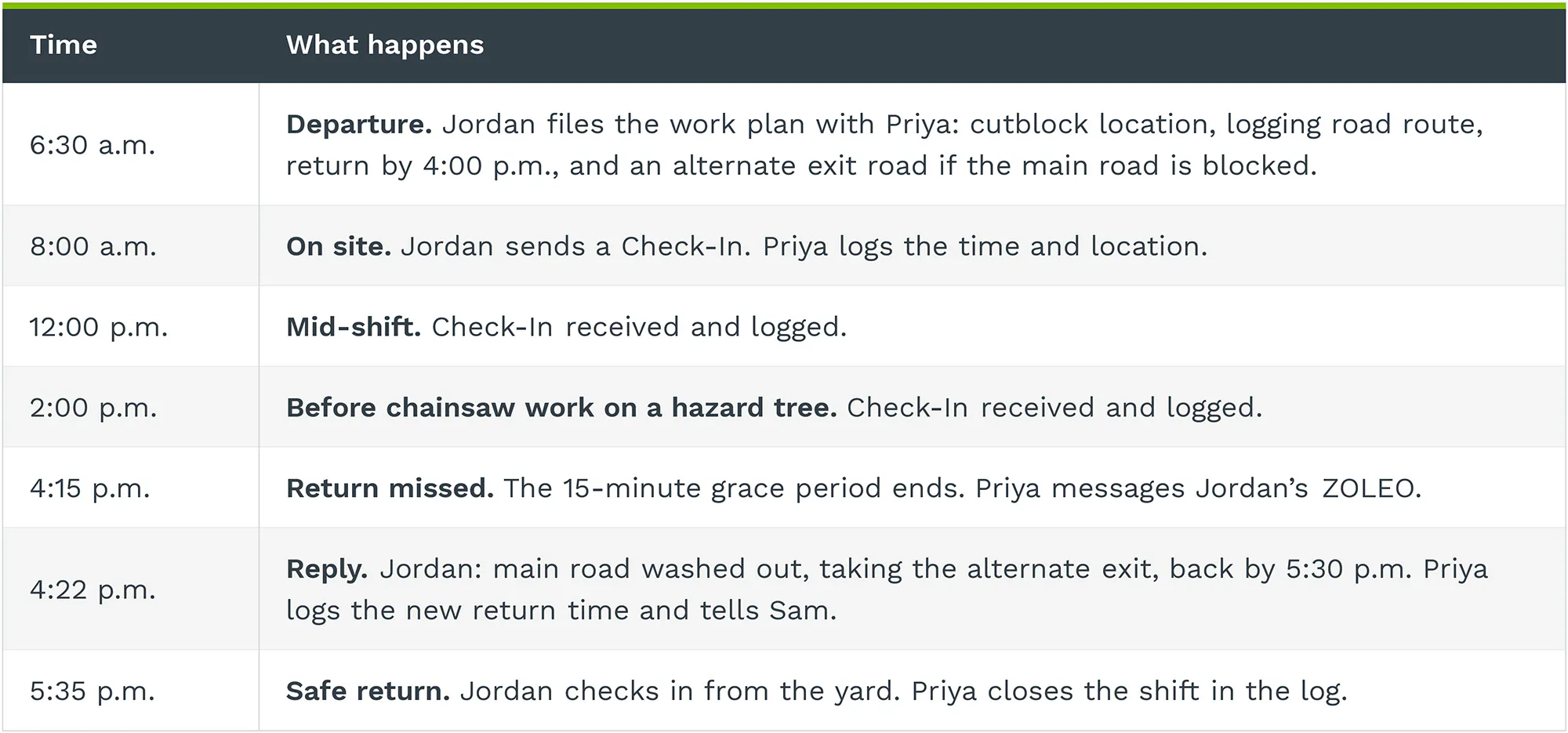
If Jordan hadn't replied by the 4:45 p.m. escalation deadline, Priya would have called Sam and started the emergency plan from the 2:00 p.m. location.
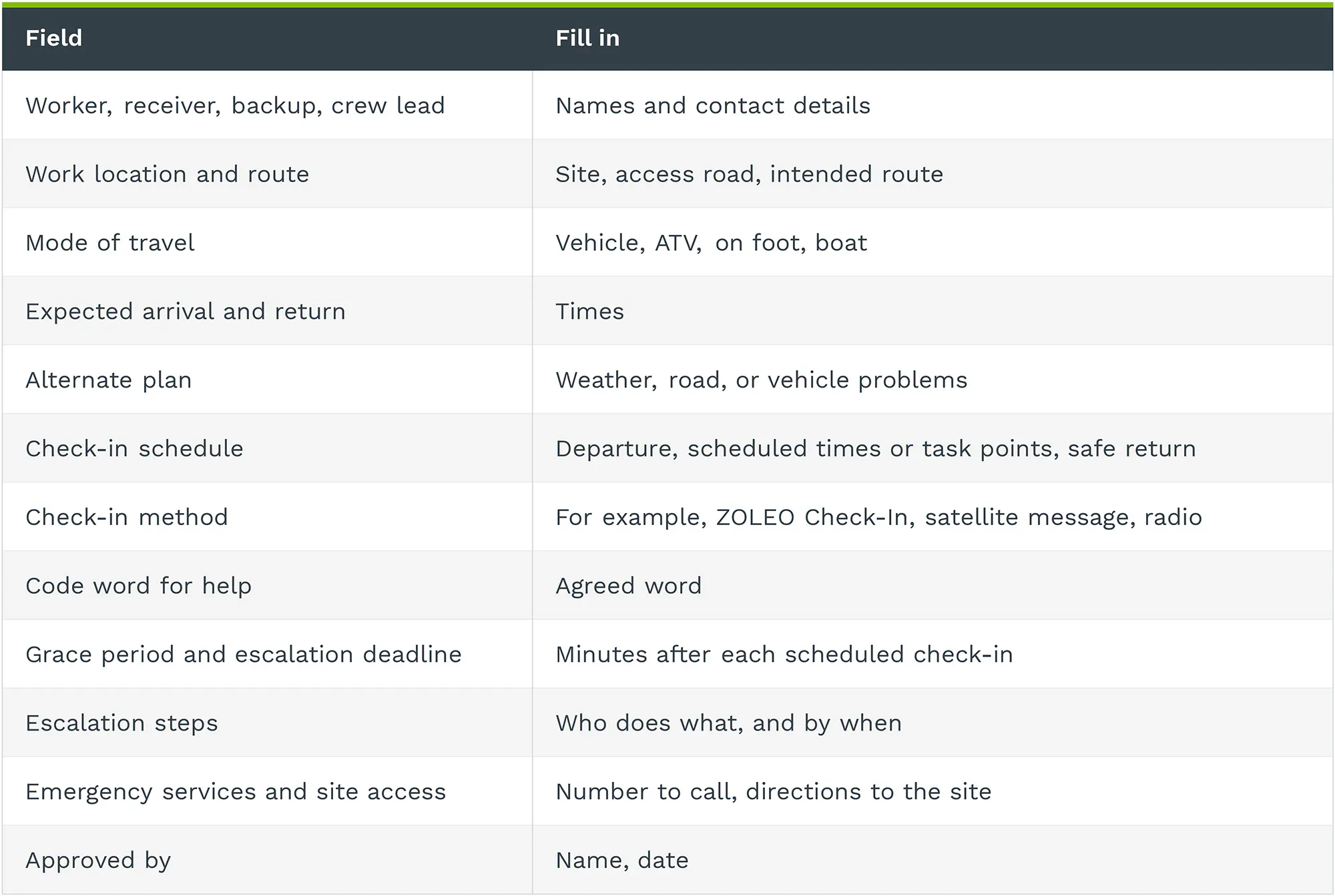
Lone worker check-in procedure template
Fill in each line for every lone-work assignment.
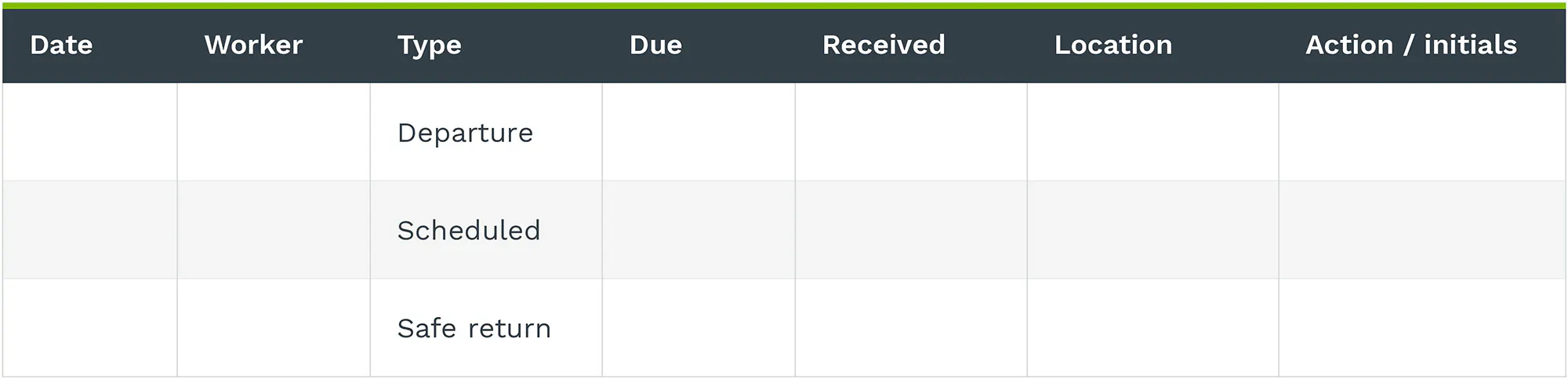
Check-in log template
Frequently asked questions about lone worker check-ins
How often should a lone worker check in?
There’s no single check-in interval. CCOHS recommends setting the frequency based on the work and its risks. In British Columbia, WorkSafeBC requires check intervals to be developed in consultation with the worker, with the procedure reviewed against the risks of the work.
What should happen when a lone worker misses a check-in?
The receiver follows the written escalation steps in order, and activates the emergency plan if there's still no contact by the deadline.
Does a satellite Check-In replace a lone worker procedure?
No. A ZOLEO Check-In can support a lone worker safety plan by giving the worker a way to report in beyond cell coverage. The procedure still determines when check-ins happen, who receives them, and what the receiver should do if one is missed.
See the routine in practice in the Coleman Environmental Engineering case study.
Compare ZOLEO business options for your crew.
Sources
- CCOHS, Working Alone: General (fact sheet revised July 31, 2025).
- Employment and Social Development Canada, Labour Program, Workers Working Alone at a Work Place Under the Control of the Employer, 905-1-IPG-059 (effective May 2016).
- “WorkSafeBC, Occupational Health and Safety Regulation, Part 4, sections 4.20 to 4.23 (Working Alone or in Isolation)
- ZOLEO, Location Share+ Overview.
- ZOLEO, Coleman Environmental Engineering case study and Check-In Messages Overview (updated July 14, 2026).
Disclaimers
¹ Active subscription required. An active ZOLEO subscription plan is required to transmit messages or use connected features over the Iridium satellite network.
² Satellite communication requires a clear view of the sky. Connectivity is not guaranteed and may be affected by satellite availability, terrain, weather, environmental conditions, device positioning, and other factors outside ZOLEO's control. Coverage details apply.
³ Some jurisdictions regulate or prohibit the use, possession, or activation of satellite communication devices. Users are responsible for knowing and complying with all applicable laws and restrictions in each jurisdiction where the device is used, carried, or activated.
⁴ SOS alerts are monitored by a third-party emergency response coordination provider. ZOLEO is not a licensed emergency dispatch service and does not guarantee rescue, response, evacuation, medical assistance, security assistance, search and rescue availability, or coordination with local emergency authorities. Emergency response, rescue, evacuation, medical, security, and related services are subject to satellite connectivity, applicable laws and regulations, local emergency response capabilities, geographic location, environmental conditions, and third-party service availability. Additional third-party costs may apply. SOS should be initiated only in the event of an actual emergency.
Help Your Team Stay Prepared.
Share this with your team or the person responsible for lone worker safety, so everyone knows when to check in, who receives the message, and what to do if a check-in is missed.